Software Gardener
Te lo cuento en español. Sounds nicer in Spanish.
Over many years of developing software I've kept evolving the way I work, until arriving at what I call Software Gardening.
Building applications is a lot like gardening: you don't just have to design and think your idea through, you also have to tend it and adapt it to its environment and to the tech novelties that change faster every day.
Creating software is creating something alive, something you have to care for.
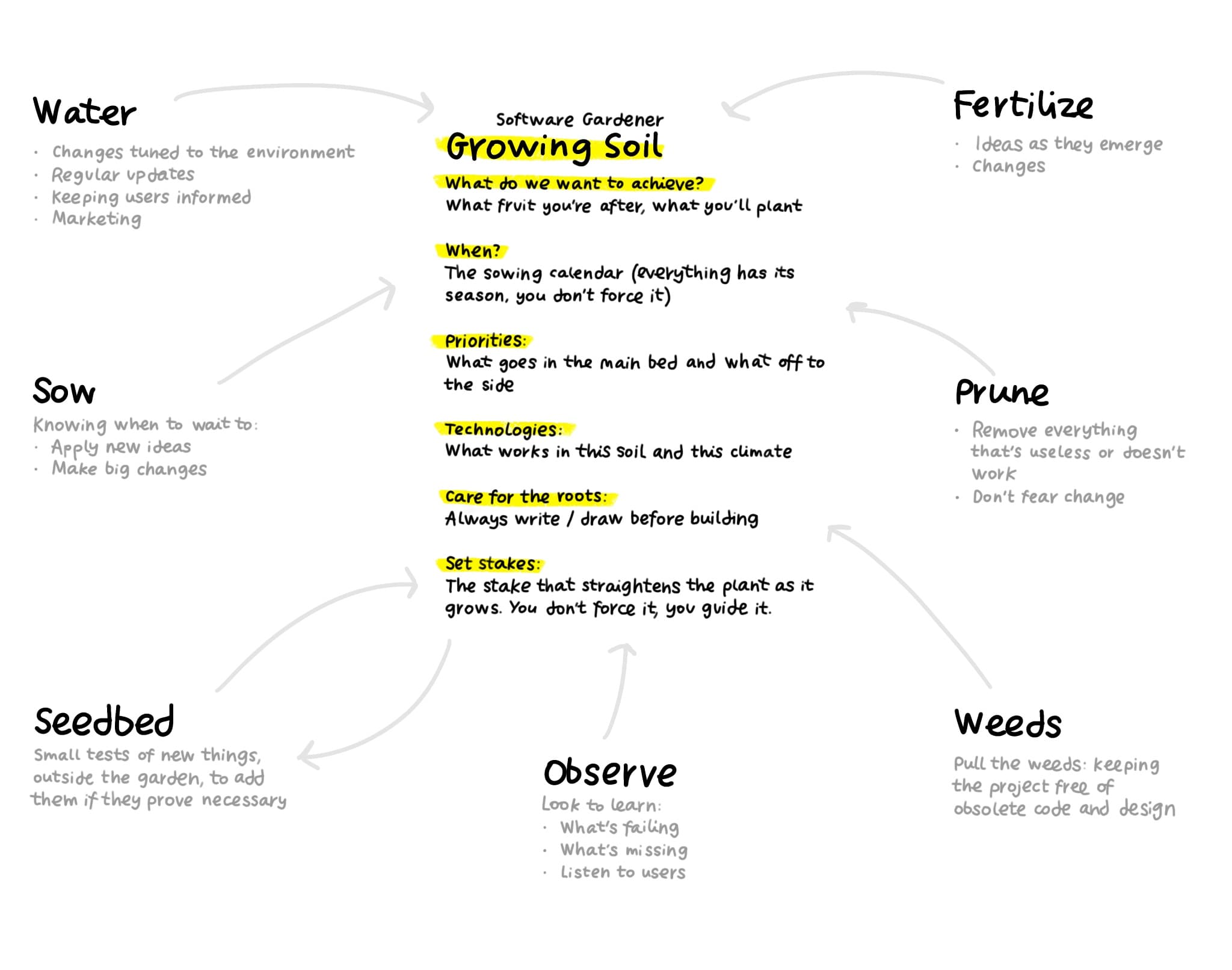
You've probably seen apps that look obsolete within a few months. I design with the gardening mindset in my head.
Minimalism and simplicity as the only possible way to adapt: something seemingly simple that actually involves quite a bit of complexity.
Designing is removing things. Choosing what matters, highlighting it and getting rid of everything else (pruning).
As a software gardener, I like to tend my projects. It's not just about planting an idea and waiting for it to grow, but about nurturing it, pruning it and adapting it to the changing conditions of the environment.
Other things to keep in mind:
Inheriting someone else's garden. Taking over a plot someone planted before you: first understand why each thing is where it is, and don't uproot what you don't understand. (legacy code)
Compost. The projects that didn't work out aren't thrown away: they rot down nicely and fertilize the next ones. Failure as fertile soil.
Grafting. Joining two plants so they grow as one. Integrating external and internal pieces.
Leaving fallow. Sometimes the best thing for a soil is to rest it for a season. Pausing a project isn't abandoning it.
No monoculture. Vary what you plant; a garden of a single crop falls whole to a single pest. (Don't depend on a single technology/client)
Cross-pollination. Bees don't work a single flower. What you learn pruning one plant you apply to the rest, and what blooms in one bed fertilizes the next. (Working on several projects at once: each one improves the others, and when one gets stuck you rotate and come back with fresh eyes)
Development + AI
I work based on spec-driven development, a way of working where you first write a detailed specification of what you're going to build, in structured, orderly natural language, and only then write the code. Basically the design sketch, turned into a software sketch.
The code becomes a consequence, not the main document. The key idea is to invert the usual hierarchy: the specification document is the source of truth, not the code. This document keeps changing throughout development, making the code adapt to it. Since we're in the garden, we could call it the growing soil.
The quality of a specification depends on accumulated experience and continuous learning, not on the improvisation of Vibe Coding, which I keep well away from.
This way of working with AI tools lets an experienced developer operate like a whole team. What used to need several people coordinating can now come out of a single, well-planned flow. Same result, less friction, more control.
How an app gets built from scratch: the guide (in Spanish)And it also changes how many gardens it makes sense to tend at once. While the AI waters and clears the weeds, the gardener thinks, decides and prunes — and that thinking time no longer fits in a single project. Working on one thing at a time has stopped making sense, and besides, it can no longer be paid for: a senior developer is too expensive and too valuable to be left watching a single plant grow. Tending several projects at once is no longer scattering yourself: it's making real use of the tool. And what you learn in one project you apply to the rest.
Planning
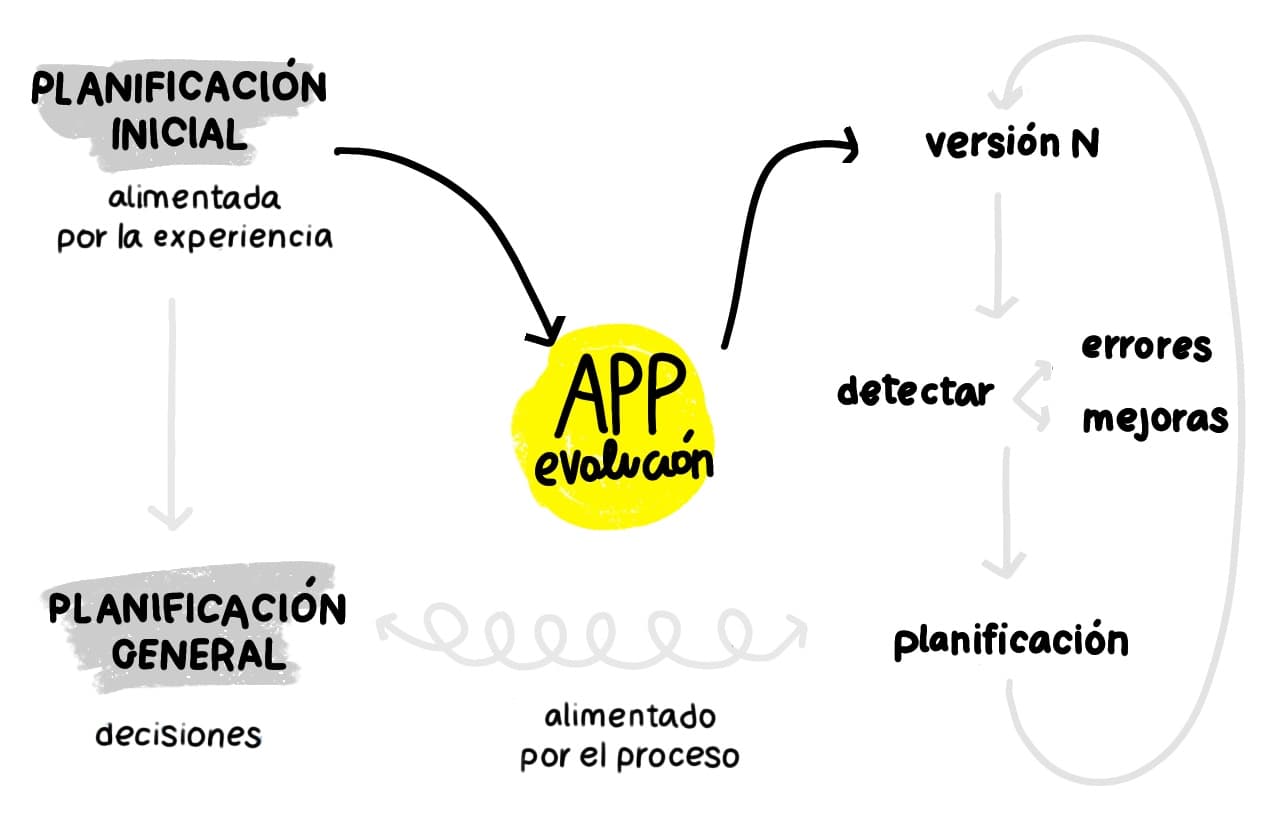
How I build
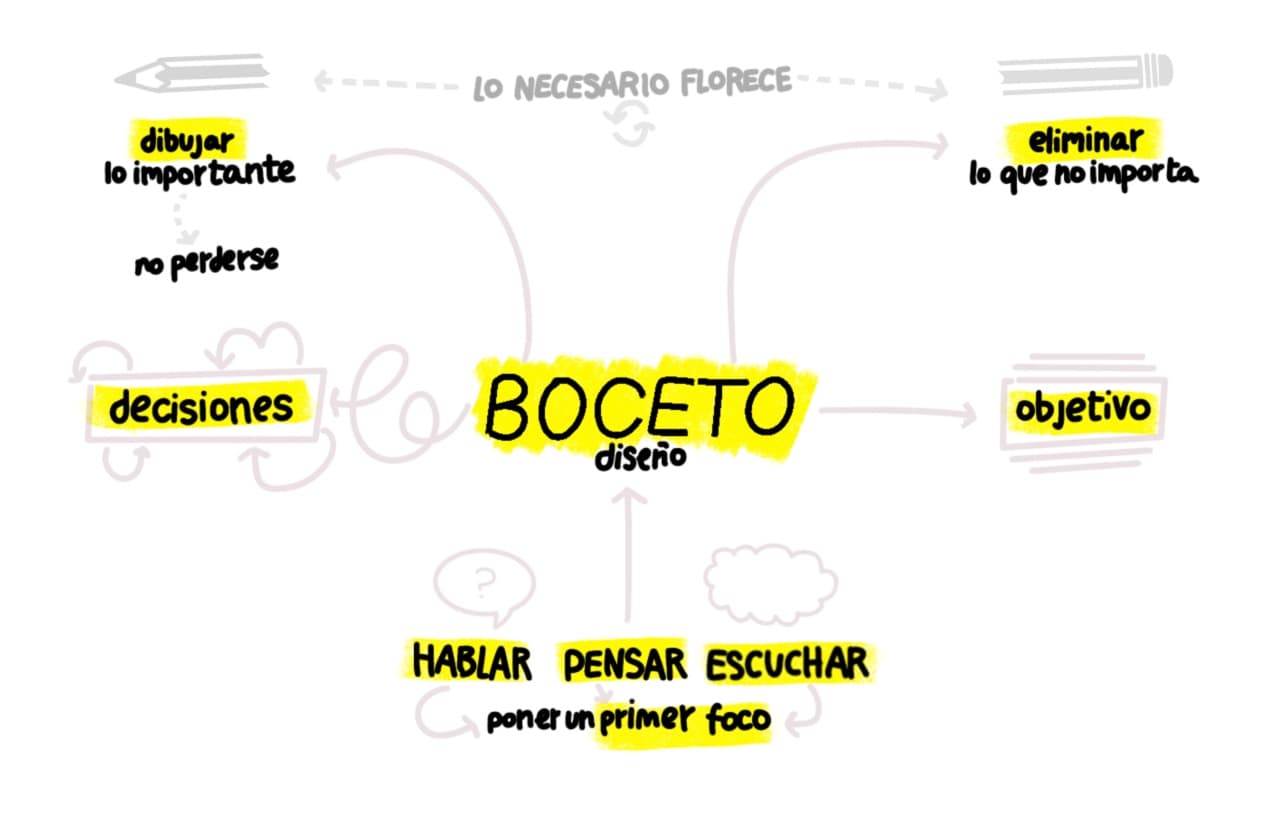
My development process
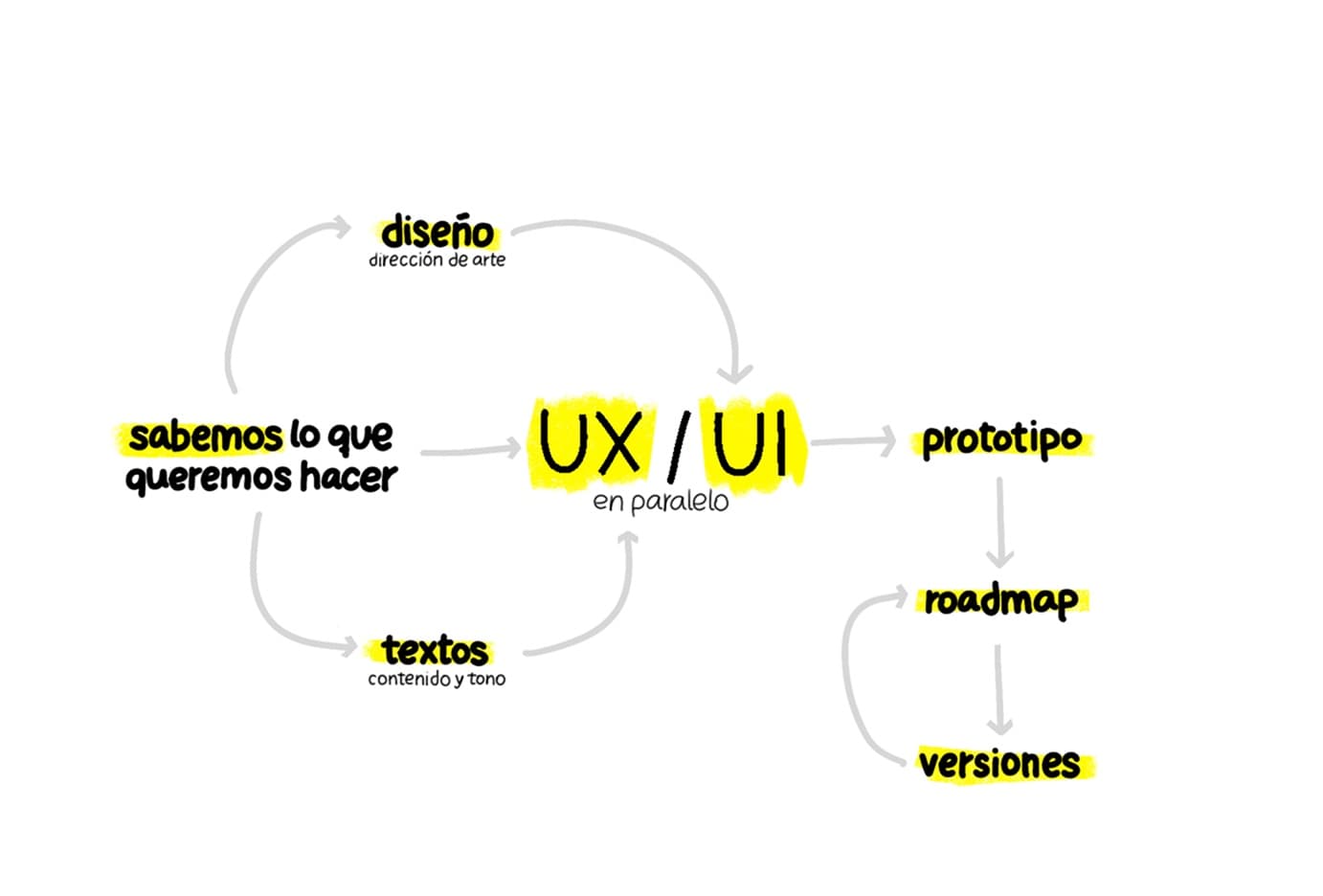
I can take care of the whole development process of an app. From the initial idea to the final launch.
I enjoy the planning and project-management side. I can help define the product, the development strategy and choose the best technical solutions.
My strengths are interface design and user experience. Spotting problems and solving them.
For the other parts of the process I like collaborating with other designers and creatives. But I can also handle them myself.
Apps
What I told you above is how I cultivate; these apps are what grows in my garden. They're not commissions: they're what I plant between one client and the next, to try out an idea with no deadline set by anyone. They come from my obsessions —making lists, ordering things and building the exact tool I feel like using— and none was born to make money, but out of need.
They're my indulgences: I rewrite or redesign them purely for the pleasure of making things better, so they're in constant change. Some have died or stopped interesting me — off to the compost, to feed the next ones. Only the latest, the ones I'm proud of, live here.
Nevera
Nevera is my shopping list and my recipe book, meant to be used with one hand while the other is busy in the kitchen. The idea was simple and that's why I liked it: sort ingredients by category, check off what's missing and save recipes —the ones I see on social media or find around— without depending on anything. Today it's the first app on my phone's home screen, the one I use most: it has changed the way I shop and cook.
Everything lives on your phone, not on servers: your lists are yours, they work offline and you can make a copy to take them wherever you want. What I enjoyed most was the recipe importer: many arrive badly formatted from AI, so I built something that reads them, fixes them if they come broken and only saves them when they're right. And a search that forgives accents and typos and answers instantly, so jotting down the shopping is as fast as crossing it off on paper.
Key tech: React Native + Expo · TypeScript · Expo Router · SQLite with Drizzle ORM · Zustand · Tailwind v4 (uniwind) · heroui-native · Fuse.js · react-i18next (ES/EN) · Bun · EAS.

CasiCasi
Tired of saying no to almost everything, I decided to say CasiCasi («almost-almost») to everything: an app to reach goals through play, built so I wouldn't have to keep telling Lia and Bruno (my kids) no. The deal is always the same: 100 points to get what they want, going up or down depending on what they do and on my capricious, unfair judgement.
Teenagers now, they needed a different kind of scorekeeping, so this summer I rebuilt it from the ground up. What I like most about this version are the challenges: I set them a task —what to do, how many points it's worth and by when— and a link reaches them wherever they'll read it, which they open without installing anything or signing up anywhere. I find out when they open it and when they say it's done, but I'm still the one handing out the points, once I've checked with my own eyes.
Under the hood, what mattered to me was that none of this should require accounts or storing anyone's data: the challenge lives for a while at an unguessable address, deletes itself once it's no longer needed, and everything else never leaves the phone. No sign-up, no cloud and nothing to watch over. And I keep a blog where I write down what changes, readable on the web and inside the app itself, without leaving it.
Key tech: React Native + Expo 57 · TypeScript · Expo Router · SQLite with Drizzle ORM · Zustand · Tailwind v4 (uniwind) · heroui-native · Skia and Victory Native (the chart) · Moti · local and push notifications (Expo) · Next.js and Redis/Upstash for the challenges · Bun · EAS.

QVO
What do I watch? was born out of despair: opening five platforms, twenty minutes of scrolling and ending up watching nothing. Life is too short to spend it choosing what to watch. QVO brings order: my lists of movies and series, the data pulled from IMDb and, at a glance, which platform each thing is on. I use it daily, and it saves me from swallowing too much rubbish (some still slips through, but less than before).
Under the hood I obsessed over two things: that it be fast and that it look after itself. It shows you what it already knows right away and checks in the background for anything new, no flicker and no nagging for more than necessary. And it's self-contained: it carries everything inside instead of depending on a separate server, like a plant that doesn't need watering from outside. The treat: a screen that cross-references my most-watched directors, genres and actors, and haptics with a personality of their own.
Key tech: React Native + Expo · TypeScript · Expo Router · SQLite with Drizzle ORM · Zustand · TanStack Query · Tailwind (uniwind) · Zod · Lottie · EAS (builds and over-the-air updates).
Citas
Citas is an app of famous quotes that appear written on screen, letter by letter, as if someone were typing them for you. I wanted a clean, minimal place to read a good quote, bookmark it, search through mine and suggest the ones I'm missing. I open it when I want to get inspired, have a laugh or start thinking about something.
What I'm proudest of can't be seen: to link quotes together and catch duplicates I don't use AI, but a simpler recipe —it looks at what they're about, which words they share and who said them— computed on the phone itself. It's fast, works offline and doesn't send your data anywhere. And since I'm the one choosing and reviewing every quote, I didn't build a separate website to manage them: the moderation tools live inside the app itself and only appear for me. All in the same garden, with no separate server to maintain.
On the design side I treated myself. I cared about the reading rhythm —the app remembers what you've already seen and starts over when you're about to run out of quotes, so it never dries up—, you pick the color with a wheel and the text turns light or dark depending on the background. I made an iOS widget and, on iPad, the app takes a leap: however you hold it, portrait or landscape, it turns into a quote frame that enters "demo mode" on its own and lets phrases drift by one after another, like a digital frame hung on the wall.
Key tech: React Native + Expo 56 · TypeScript · Expo Router · SQLite with Drizzle ORM · Zustand · Tailwind v4 (uniwind) · Moti · Gesture Handler · Redis/Upstash backend · Bun · EAS.
Different plants from the same garden. What they share isn't the technology, but the way they're cared for: thinking before planting, automating the boring parts and not calling anything good until it convinces me. They're the most honest proof of how I work when something excites me.